When you log in to the User Portal today, you’ll be presented with the option to try the new Public Beta of our V2 User Portal. This is currently running at newmy.wpengine.com where you will see the brand new design for the WP Engine User Portal.
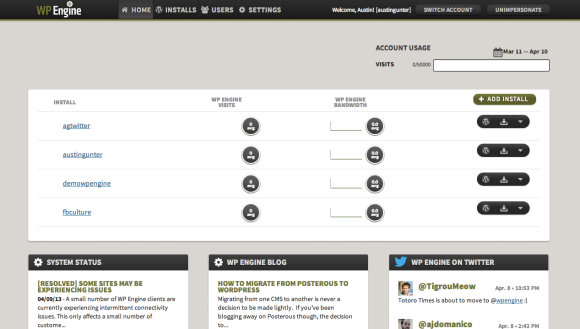
The dev team collaborated with our UI expert to completely re-design of the Portal’s UI. Along with the new design, and you will also notice the first set of several exciting new features we’re releasing this year. From today through the summertime, we’ll be releasing powerful new features inside the WP Engine User Portal that will make WordPress development and deployment even better and more user-friendly.
The Re-Design
Once you’re inside the User Portal, take a look around. The UI is cleaner, and more intuitive to use. You can easily create a new install and see the stats for a given install.
From within the portal, you can easily check the stats of your site, manage users, domains, redirects, and the like. Over the course of the coming months we’ll be rapidly iterating and adding awesome brand new features. Watch this space!
Ability to Copy from Staging to Production
WP Engine was the first to release a one-click Staging Area – a feature which empowers clients to clone their live site and obtain a staging site separate from their live (production) site.
The staging area was a huge benefit to customers, making it possible for developers to stage new code and designs to run tests prior to pushing those changes to the production site. No more, “doing it live” or “cowboy coding.”
In the past, moving content back from Staging to Production was not officially supported, but could be cajoled by first pulling the code down to your computer and then SFTP’ing or Git-Push’ing the changes up to the production site.
Today, along with the redesign of the User Portal, we’re also releasing the ability to deploy from Staging to Production with a click.
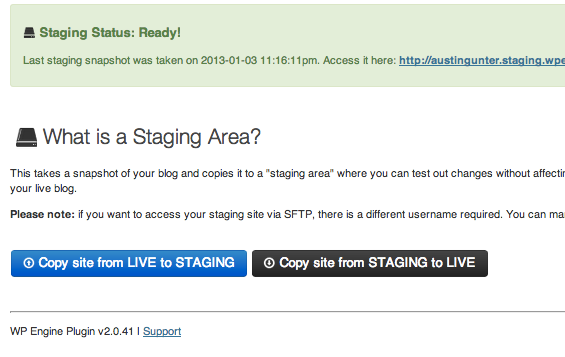
Specifically, this now creates the opportunity to stage radical changes to your site or blog – such as a new theme, new content, new widgets, etc. The feature refines the process where you can test your new look, and then push the changes back to production in one go. This avoids putting your site in maintenance mode and avoids half-broken sites as new widgets are added and themes configured, etc.
If you take a look inside your WP Dashboard at your staging area, you’ll see a brand new button that says, “Copy from Staging to Live.” It does exactly what it says.
Let’s say you’re staging the fancy and responsive TwentyThirteen theme, and you’ve decided you love it, it’s poetry, and you want to deploy it on production. All you have to do is go to the “Staging” tab in your WP Dashboard, and click on the “Copy from Staging to Live” button.

Next, you’ll choose to move your staging database tables to production or not. The tables store your content, comments, links, etc. If your site has had content changes since you created this staging area, then you may not want to copy your staging tables to production because that would overwrite production tables. For example, if you’ve published new blog posts, or received new comments since you created the staging area, you don’t want to copy those tables.
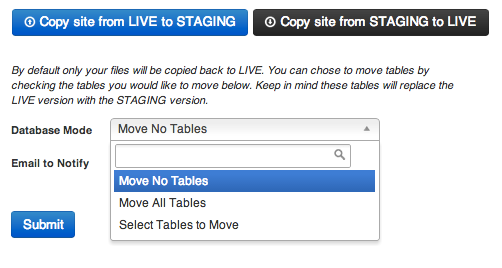
The default setting is to not to move any tables. You can also chose to move all tables, or move a custom set of them. Unless you know which tables contain what content, we don’t recommend you start playing around with them.
But just in case, we automagically create a restore point for your site every time you copy from Staging to Production. If you need to roll changes back, you can. And remember, if you want to keep the files you just copied over, and only restore the tables with your content, the restore point lets you do that.
This feature is being rolled out across accounts and will be enabled on all sites by the end of next week. Please bear with us if your site does not yet have this functionality.
Awesome! What else do you have in store?
That’s just a glimpse of the new game-changing features we’re adding this year, each of which will be awesome in their own right. Some of the most powerful features in the User Portal aren’t live yet. Look for word on our blog (and elsewhere!) for new feature releases that will happen every two weeks until the summertime.
You can expect WP Engine to continue to drive a constant wave of innovation and to offer our clients new features that improve their WordPress experience, front to back.
Awesome news! I give this news two THUMBS up and an obnoxious car honk because it truly is awesome. Love the new features, keep it up!
Awesome. Two quick suggestions: 1) bring back the total count of websites under the account, I liked seeing that and it’s now gone. 2) when you have 15+ sites in an account (as we do) the sidebar menu system is inconvenient since we have to keep scrolling all the way down the page to select a submenu item (Overview, Domains, Redirects, etc) then all the way back up the page to see the actual control panel. We have 80+ sites on our account, so this won’t be an issue for everyone.
Also, question – now that you offer two way push between staging and production will you be backing up staging sites?
This is another reason to love you guys. You just don’t get this with low-cost shared hosting solutions.
Looking forward to seeing what you have upcoming in the User Portal. Glad the redesign happened, though, because that was a great UX.
Much, MUCH better. Nice work all around, team WPE!
This is just plain awesome, the user experience just took a big step forward. Great work!
Deploy from Staging to Production is a killer feature, and just one more thing that sets WPEngine apart from the rest! I look forward to using this many times in the future. Keep up the good work.
Nice update team!
Here’s to hoping one of the pending features is a personalized ‘default’ install.
Also, I think the gopher/praire dog guy is cute (http://foo.wpengine.com/) but wonder if there should be a more “refined” error page in case things go wrong with an install.
Looking forward to new stuff from WPE!
Mike
Love the new UI! It’s so much better and easier to use than the old one. Good job all round. A few comments:
1. Home screen
On this page the text inside the circles (Averages) is a bit heavy and hard to read. I think it either needs to have less weighting, increase leading or make the text size large. Or all three?
2. Backup/restore points
Please, please, please give us the option to change the date format for our accounts. Having the American mm/dd/yy format for the rest of the world makes us have to work a lot harder when skim-reading. I also think it would be a lot easier if the date was visually in the format yyyy/mm/dd.
Minor things obviously. Overall, I love it! Congrats to all involved!
Mike
Hi folks,
Nice job bringing a little more design life into the site. It looks really nice.
Just a bit of feedback:
I like the addition of graphs on the overview page. Things seem to make more navigational sense in the new interface.
I would like to see my per-site links a little closer to the top of the page. Since I have more than 30 site, I sometimes find that links to domains, redirects, and error logs are way down on the bottom of the page. The extra scrolling makes that aspect a little more difficult to use.
Overall, the design has some really nice touches, making it easier and faster to get to where I want to go.
Thanks,
David
Look forward to check out the staging > production change deployment.
Also still hoping for account facing management of SSH keys… there was some talk of that a while back, hope it still somewhere on the development roadmap.
Awesome!
This could not come at a better time for me. Now I can do my entire summer rework on my staging site and push over to live for fall session without disrupting my current members.
Looking forward to this.
We did this, it work fine, but lost content as we didn’t realise date of the snapshot, anyone had problems copying a incorrect version of the website?
Thanks for your question Lee,
If you make content changes on Production, and then push Staging to Production (without first pushing those changes from Production to Staging), you will lose any new posts.
The resolution will depend on the issue you’re experiencing. If the content you are missing is lost in Posts, you’ll want to download a backup point (zip file) of your site and import MySQL.sql—found in the /wp-content/ of the zip file. If the issue is about images, you’ll need to re-upload them, or upload from the backup file.
The easiest way to get this fixed might be to get in touch with our Support Team—they’re always happy to help. Simply head on over to our User Portal and either open a Live Chat or submit a Ticket.
Hope that helps!
– Kirby