WP Engine

Solutions
AgencyEnterpriseSmall & Medium BusinessMarketer
How WP Engine supports marketers.Benefits for marketers.Features that help you innovate.
Developer
How WP Engine supports developers.Benefits for developers.Features that help you move faster.
Explore Our Platform
Insights
Thought LeadershipTopics

Read articles, trends, and insights on these topics from leaders in marketing and technology.

Creative AgilityEnterprise PerformanceActionable IntelligenceEcosystem Integration
Resources

Access ebooks, whitepapers, webinars, and other knowledge from our ecosystem of digital experts.
Visit Resource Center.

Delivering a Slam Dunk Experience on WordPressEbook: The Ultimate Guide to WordPress Plugins15 Common WordPress Mistakes Agencies and their Clients Make
Case Studies
About
Our CompanyOur PlatformLatest News

Access the latest news from inside WP Engine.
Visit the Newsroom.

WP Engine Secures Strategic Growth Investment From Silver LakeWP Engine Unveils First WordPress Digital ExperienceWP Engine Expands Global Presence with New Office in Brisbane
Media Center

Get announcements and resources about WP Engine.

Press Releases
Careers at WP Engine
Pricing
Sales Questions?

Contact Sales

Discover why organizations of all types and sizes choose WP Engine — and how it can benefit you.

Chat

1

I'm available right now to answer any of your questions!

Reply

Call

+1-512-201-4819

Contact

Send a message

Compare Plans
Need Support?
Support DocumentationBilling HelpSupport

We offer support 24 hours a day, 7 days a week, 365 days a year. Log in to get expert one-on-one help.

Log in for support

Sales Questions

Contact Sales

Discover why organizations of all types and sizes choose WP Engine — and how it can benefit you.

Chat

1

I'm available right now to answer any of your questions!

Reply

Call

+1-512-201-4819

Contact

Send a message

Sign in
Sign in
Search

Search

Compare Plans
Call Sales +1-512-201-4819
Menu
AgencyEnterpriseSmall & Medium BusinessMarketers
How WP Engine supports marketers.Benefits for marketersFeatures that help you innovate.
Developers
How WP Engine supports developers.Benefits for developers.Features that help you move faster.
Our PlatformPricingResource CenterOur CompanySolution CenterThought LeadershipDocumentationCareers

Is your content optimized for Twitter sharing?

Austin Gunter 7.4.2013

optimize content marketing for twitter with buffer

We share a lot of content every week at WP Engine. Part of how we connect with new customers, and strengthen connections with old ones is by being a source for quality content on our social media profiles. One of my favorite tools to share content is called Buffer, and it is a simple tool that allows you to share blog posts on your preferred social networks.

Buffer is basically one of the best time-saving hacks for effective content marketing. Just add the browser extension, find awesome content, click the button, choose the social network you want to share on, and go. 

Ok, so assume people are coming by your site on a regular basis, and they want to be able to share your content via their Buffer. They also want to be able to attribute the post to your Twitter profile.

How Buffer works

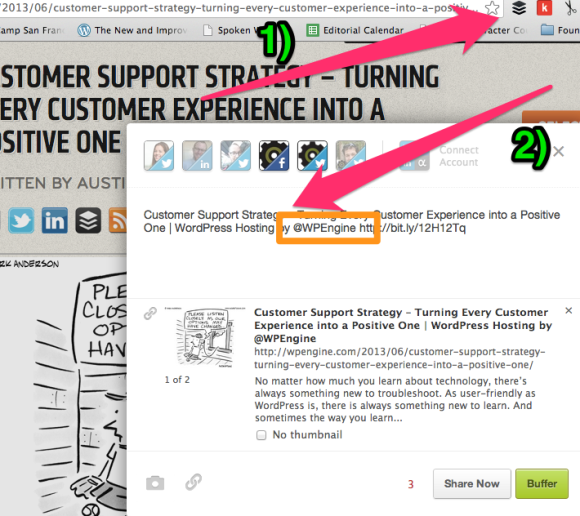
You’ll notice that Buffer auto-populates the <title> tag of blog posts into the share box. So, that’s pretty legit, because it means that when you’re sharing content, you don’t have to spend those extra 20-30 seconds re-typing the title of the post. If you’re batch-scheduling content for a week or two, shaving 20-30 seconds off of a repetitive action is significant.

By default, WordPress inserts your site name into the <title> tag, but that’s sub-optimal, because it means that people either have to memorize your Twitter handle (not happening), or they’ll hunt on your site for it (unlikely), or just not attribute the article to your Twitter handle.

So let’s fix that. Let’s add your Twitter handle to the <title> of every blog post in your WordPress site.

Change the <title> tag in your SEO plugin

Mosey your bad self over to your SEO Plugin (you do have an SEO plugin, right?). You’re looking for the “Post Title Format” field. This is what we’re going to edit. It should be under a header like “Title Settings” or “Post Types.”

The “Post Title Format” field will already be filled out with the following “%%post_title%%  %%sitename%%” where “%%post_title%%” refers to the title of your post, and %%sitename%% refers to the Site Title in the General Settings tab.

Replace %%sitename%% with “by @yourtwitterhandle.”

You’re almost done. There’s a checkbox to force the SEO plugin to re-write the post titles with your Twitter handle. On All In One SEO Pack, the checkbox is called “Rewrite Titles” and Yoast calls it “Force rewrite.”

Once you’ve added your Twitter handle and forced the rewrite, save the changes. Now, when you switch over to a post on your site, you’ll see the changes reflected if you Buffer the post. Or you can view the source of the page, look for the <title> tag, which will now include “by @yourtwitterhandle” instead of your site name.

It’s a subtle change to your site, but it’s an important way to have a unified content marketing strategy.

More WordPress news from WP Engine

Customer Support Strategy – Turning Every Customer Experience into a Positive OneFinely Tuned Consultant – Cooper Dukes

Comments

  1. Leslie says

    July 4, 2013 at 4:34 pm

    This is a great tip. I actually implemented it on my main site while reading the article. Thank you!

    Reply
  2. John Garrett says

    July 7, 2013 at 11:23 am

    Nice one, Austin. I’ve already got this working on my site.

    But I noticed in Yoast’s plugin (version 1.4.13 at this date) the “%%post_title%%” doesn’t work and is now replaced by simply by “%%title%%”, which grabs the title of the post OR the page.

    For anyone else reading, if using Yoast’s WordPress SEO, you can view all the tags by going to “Titles & Meta” then clicking the “Help” tag on the right.

    I’m also using Triberr, so I’m not sure if this is going to result in a duplicate Twitter handle or not (I suspect it will), but I’ll soon find out. Hopefully a happy medium can be struck.

    Thanks for the info!

    Reply

Leave a Reply Cancel reply

Your email address will not be published. Required fields are marked *

  • Subscribe

    Subscribe to our blog to get great tips for your WordPress site.

  • Favorite Tweets by @wpengine
  • Sign In

    Solutions

    • Agency
    • Enterprise
    • SMB
    • Marketer
    • Developer

    Insights

    • Blog
    • Torque
    • Velocitize

    About

    • Our Company
    • Leadership Team
    • Our Platform
    • Careers
    • Affiliates
    • Contact
    • Legal
    • Newsroom
    • Privacy Policy

    Resources

    • Resource Center
    • Documentation
    • Solution Center
    • Find an Agency

    WP Engine

    504 Lavaca Street, Suite 1000
    Austin, TX 78701

    Sales

    +1-512-201-4819
    [email protected]
    7am–7pm CST

    Billing

    [email protected]

    • Facebook
    • Twitter
    • LinkedIn
    • YouTube
    • Instagram
    • RSS
    © 2013—2026 WPEngine, Inc. All rights reserved.
    WP ENGINE®, VELOCITIZE®, TORQUE®, EVERCACHE®, and the cog logo service marks are owned by WPEngine, Inc.