

WordPress and Google Docs
If you are a content creator with WordPress, working with a team can sometimes be a challenge. Out of the box, WordPress doesn’t allow real-time collaboration in the same way some of our favorite tools do; Namely, Google Docs! However, using Google Docs and WordPress together can be a winning combination. WordPress already inherits styles and formatting from your Google Docs drafts when you copy and paste into your posts. However, Automattic just released a Google Docs add-on for WordPress that makes this integration even easier! If your website is hosted on WordPress.com or you use the Jetpack plugin on your WordPress site, you are able to use this add-on to publish a draft to WordPress right from Google Docs.
Benefits of Using Google Docs with WordPress
So why use Google Docs to write content when WordPress is already a content management system (CMS)? Google Docs is a preferred method of drafting and editing by many organizations. Beyond just the ability to use single sign-on (SSO) to access Google within your organization, you can also limit sharing to only your org or only specific people, and further limit whether they can view-only, comment/suggest, or fully edit the document.
This means the benefits of using Google Docs with WordPress are also many: Collaboration with team members, easy translation of styles to your published format, and no annoying tab and window switching when trying to publish your post. And, perhaps most importantly for some, you don’t have to give your team access to your WordPress Admin Dashboard in order for them to contribute to your content.
Google Doc to WordPress Integration
Integrating Google Docs with WordPress may sound challenging, but in reality the setup is quite simple. Following a few simple steps, you can download the Google Docs extension, sign in to your WordPress.com (Jetpack) account, and begin drafting and publishing Google Docs into WordPress in a snap!
Use Google Docs to Post to WordPress
Posting to WordPress from Google Docs is easy with the add-on for WordPress.com (Jetpack). Before continuing, make sure you have a free Google/Gmail account, that Jetpack is installed and configured on your WordPress site, and that you have registered with a WordPress.com account through Jetpack.
- First, download the Google Docs add-on for free from the web store.
- You will be taken to a blank Google Doc with your Google Drive account.
- To integrate this doc with your WordPress site, navigate to the Add-ons menu in Google Docs and select WordPress.com for Google Docs > Open.
- You will see the option to Add WordPress Site on the right side of the page. Click the button to sign in to your Jetpack/WordPress.com account.
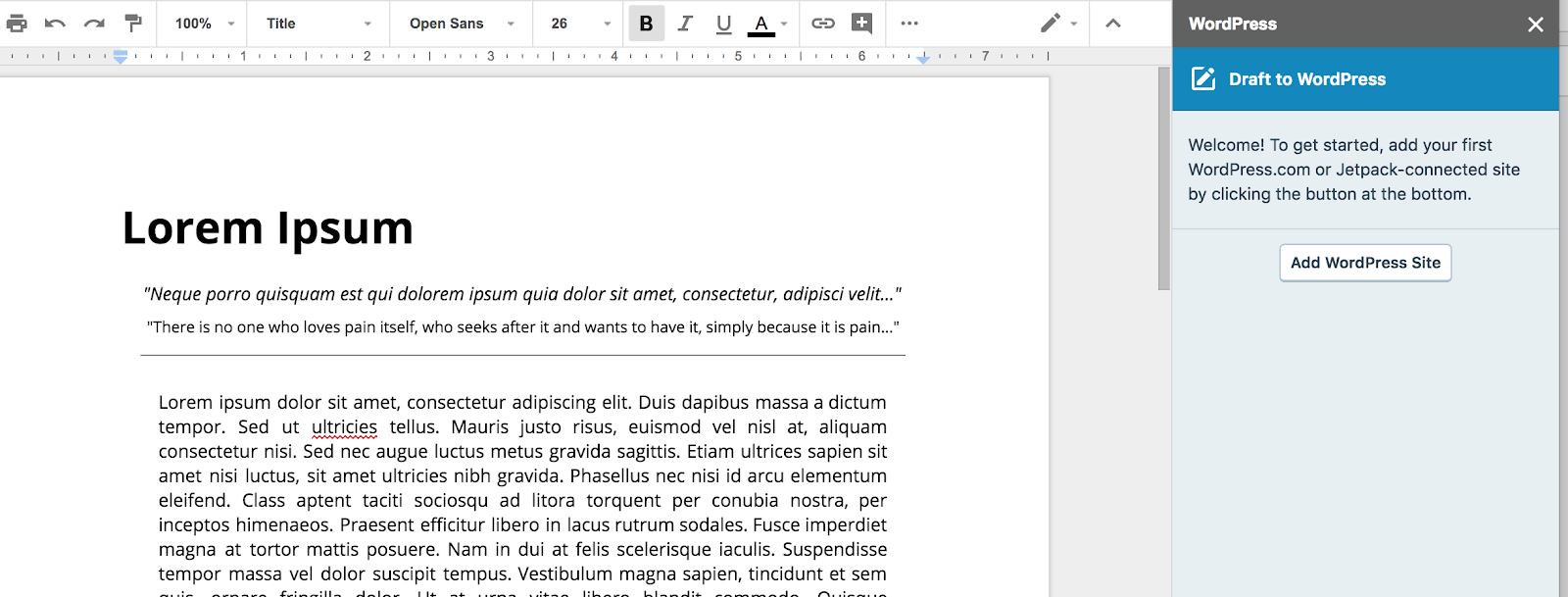
- Once you are signed in, select your site (if you have multiple sites, you will be able to choose from a list).
- After selecting your site, you will be taken back to Google Docs, where you can draft your post in your WordPress site using the Save button.
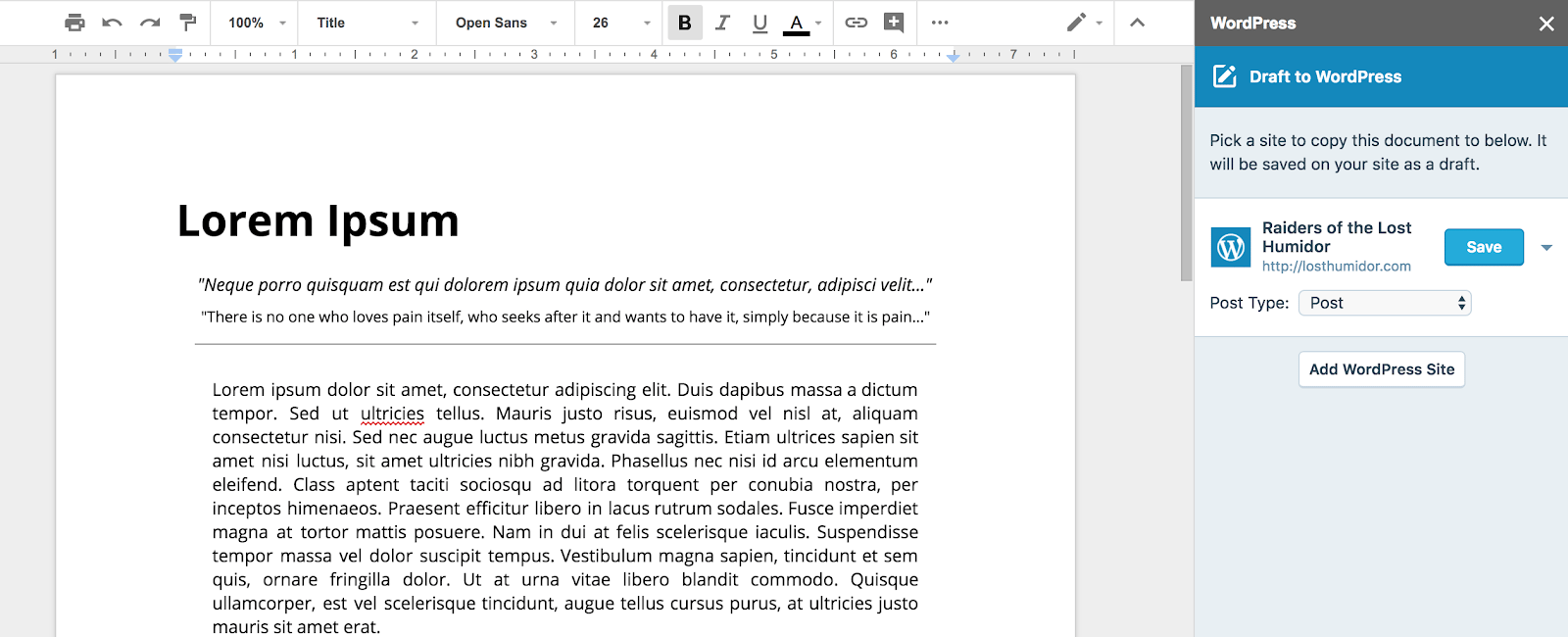
- This will create a draft of your article or post in your WordPress Admin Dashboard. You’re all set!
Embed Google Docs in WordPress
Sometimes your team may choose to embed a Google Doc in a WordPress Post or Page. This is easy as well, using the Google Drive Embedder plugin. This plugin is installed in your WordPress Admin Dashboard, and can be used to embed Google Docs within your content. This is useful because it automatically syncs changes made to the Google Doc over to your website. Gone are the days of updating the same content in two places.
- Install the Google Drive Embedder and Google Apps Login plugins in your WordPress Admin Dashboard, and activate the plugins.
- Configure the Google Apps Login plugin to connect to your Google account using two codes from Google. Enable the checkbox for Google Drive API access in this process.
- You will now see the option to Add Drive file in your editor window when creating Posts, allowing you to embed files from your Google Drive!
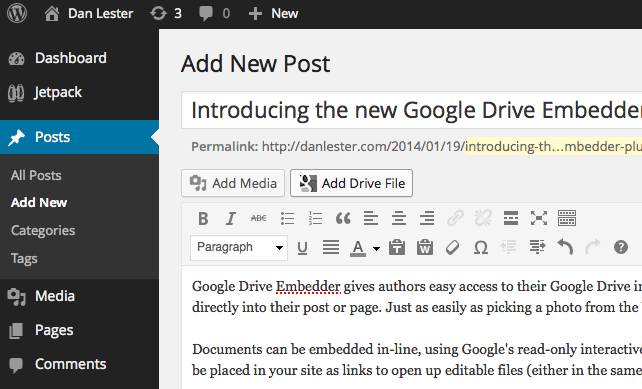
source: wordpress.org
Make sure your documents are set with the correct permissions for the world to view when using the Embedder plugin!
WP Engine and Content Insights
WP Engine is the world’s first WordPress Digital Experience Platform, bringing you Creative Agility, Enterprise Performance, Actionable Intelligence, Ecosystem Integration, and Legendary Service. Our focus on intelligence has meant delivering useful products for developers and marketers alike.
One of the biggest struggles for marketers and content creators has been creating easy ways to see how content from specific authors, post types, or topics is performing with their user base. WP Engine offers actionable insights about your content by integrating WordPress data like tags, categories, authors, and post types, with raw Google Analytics data about your visitors. The result is an incredible cross-section of useful data to inform your content strategy: Content Performance.
Ready to dive into your next digital experience? Learn about WP Engine plans.